New player for singa77 in Guide.

singa77 Help Center Live Casino App - Blackjack & Roulette

We offer live-dealer tables accessible through our singa77 mobile app and desktop platform, with support for DANA, e-wallet, mobile banking, and local payment deposits. Our Help Center guides you through account setup, game mechanics, payment flows, and troubleshooting so your experience remains smooth whether you're playing blackjack in Jakarta or roulette from Surabaya.

Open an account
singa77 featured game showcase

Help Center

Game
Category
Live Table / Card
RTP
medium

Live-dealer gaming on singa77 requires a working internet connection and a funded account. We stream real dealers across multiple studios, each equipped with multi-camera feeds so you see every card and chip in high definition. Our app is optimized for low-bandwidth streaming, meaning you can play on 4G or WiFi without constant buffering.

Live-Dealer Basics on singa77

Our live-dealer studios operate continuously, with blackjack, roulette, baccarat, and Dragon Tiger tables available at multiple stakes. Each table is staffed by a professional dealer who manages the game in real time. You place bets through the singa77 interface, and the dealer executes your actions on the physical table. The entire session is streamed to your device with a slight delay (typically 2–4 seconds) to account for network transmission.

When you join a live table on singa77, you see the dealer, the shoe or wheel, and a chat window where other players and the dealer may communicate. Our platform displays your current balance, bet history, and session statistics. If you disconnect during a game, we save your bet status and reconnect you to the same table within seconds.

Live dealer studio with multiple camera angles and dealer at blackjack table

Live-dealer games on singa77 are not recorded outcomes; they are live broadcasts of real tables with real dealers, so each hand is independent and uncontrolled by software.

singa77 game operations

Mobile App Optimization

Our singa77 app is built for phones and tablets running iOS or Android. We optimise video streaming so that even on a 3G connection, you can watch the dealer and place bets without long load times. The app caches your account details and recent game history locally, so login is faster on repeat visits. You can adjust video quality in settings: choose High for clearer card details, or Standard to save data.

We also offer a web version at singa77.app that works on any browser. The desktop version provides a wider screen for viewing multiple tables at once and is useful if you want to track Liga 1 matches alongside live roulette during tournament season. Both the app and web platform use the same account and balance, so you can switch between devices without restrictions.


singa77 app interface showing live blackjack table on mobile screen
App: live blackjack on mobile
Deposit screen with DANA OVO GoPay payment icons
Payment options on singa77
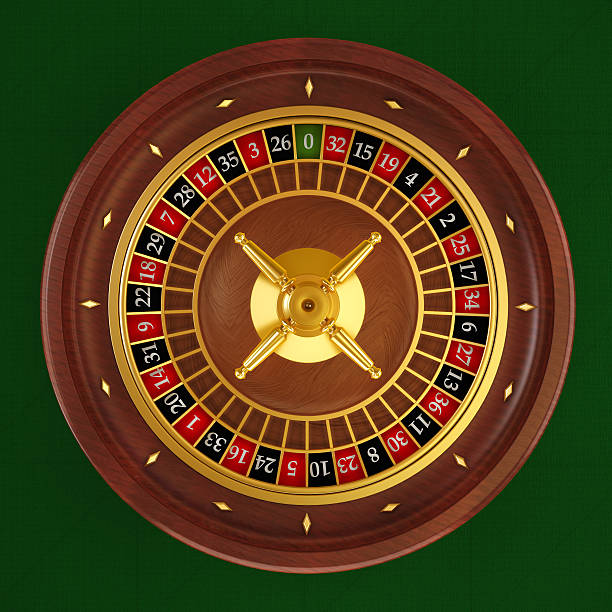
Roulette wheel spinning in live dealer studio with multi-camera feed
Live roulette with multi-camera view

Account Verification and Deposits

To play on singa77, you must create an account and verify your identity. We ask for your name, date of birth, phone number, and email address. Verification is instant for most players, though some accounts are flagged for additional checks (for instance, if you are using a payment method from a different city than your registered address). Once verified, you can deposit using DANA, e-wallet, mobile banking, local payment, or bank transfer via online payment, e-wallet, mobile banking, local payment, or online payment.

Deposits on singa77 are processed immediately for e-wallets and within one to two hours for bank transfers. Your balance appears in your account as soon as the transaction is confirmed. There are no fixed minimum or maximum deposit amounts on singa77; instead, your limit depends on your account status and payment method. New accounts typically have lower limits, which increase as you build transaction history.

Note: We require identity verification before your first withdrawal. If you have not uploaded an ID, our system will prompt you when you request a withdrawal.

Withdrawals and Processing Windows

Withdrawals from singa77 are subject to verification and anti-fraud checks. You can request a withdrawal to the same payment method you used to deposit. For example, if you deposited via e-wallet, your withdrawal will return to your mobile banking wallet. Bank transfers to local payment, online payment, e-wallet, or mobile banking accounts are processed during business hours on weekdays; evening and weekend requests may be queued until the next business day.

We do not promise subject to verification; processing depends on your bank's settlement time and whether our system needs to conduct additional checks. In most cases, withdrawals clear within one business day. If your withdrawal is delayed beyond the normal window, contact our support team via the Help Center or the in-app chat. We investigate all disputed transactions and keep you informed of the status.

Live-Dealer Game Rules

Blackjack on singa77 follows standard rules: the dealer stands on 17 and hits on 16 or less. Insurance is available if the dealer shows an ace. Baccarat rules are fixed: the hand closest to nine wins, and ties pay even money. Roulette is European-style with 37 pockets (0–36). Our Dragon Tiger tables use a simplified baccarat mechanic where the highest card wins.

We provide a detailed rule sheet for each game table. When you join a live table on singa77, you can open the rule panel to confirm betting limits, side-bet options, and payout rates. Our dealers announce the rules verbally at the start of each shoe or wheel, and chat is available if you have a question during play.

Help Center interface with FAQs and contact options for singa77 support

Our Help Center is designed so you can find answers to common questions without contacting support. For issues that require a live response, we maintain a ticketing system and live chat.

singa77 customer operations

Connection Stability and Reconnection

Live-dealer games require a stable connection. If your internet drops during a hand, the singa77 app will attempt to reconnect you automatically. If reconnection fails, your active bet is void and you rejoin the table for the next hand. We log all disconnections and bet outcomes, so you can review what happened in your bet history.

If you experience frequent disconnections, try switching from mobile data to WiFi, or moving closer to your router. Our app adapts to poor connections by lowering video quality temporarily; you may see the stream pause or reduce resolution, but the game will continue. If problems persist, report the issue via the in-app support form and include your connection type (WiFi, 4G, 3G) and device model so our team can investigate.

Key takeaways

  • Live-dealer tables on singa77 stream real dealers; games are not software-generated.
  • Mobile app optimizes for low-bandwidth play; video quality is adjustable in settings.
  • Deposit via local payment, online payment, e-wallet, mobile banking, or bank transfer; withdrawal returns to the same method.
  • Account verification is required before your first withdrawal.
  • Game rules are displayed at each table; dealers explain them verbally at the start of each round.
  • Contact support via Help Center, in-app chat, or support form if you experience technical issues.

Getting the Most from singa77

Our Help Center exists to answer questions about how singa77 works. Whether you're new to live-dealer gaming or you play regularly during Idul Fitri or other peak periods when traffic is high, we document every step: account creation, payment methods, game rules, and withdrawal requests. We update the Help Center as we add new features or adjust our processes.

Most questions are answered via our FAQ section or the in-app guide. For urgent issues—such as a missing deposit or a withdrawal held for verification—our support team responds through live chat. We maintain a ticket system so your request is tracked from submission to resolution. Our service is available to users in jurisdictions where our operations are legally permitted; your account access depends on your location and applicable local law.

Start by exploring the Help Center topics below. If you cannot find what you need, open a support ticket or contact us via live chat, and one of our team members will assist you. We aim to keep singa77 straightforward and reliable for all our players.

Payment Methods Deep Dive

DANA deposit and withdrawal

DANA is one of the fastest deposit methods on singa77. To deposit via DANA, open the singa77 app or web platform, navigate to Deposit, and select DANA. You will be redirected to the DANA app (if installed) or the DANA web login. Enter your DANA PIN and confirm the transaction. The funds appear in your singa77 account within seconds. No receipt code or manual entry is needed; the system links automatically.

Withdrawals to DANA work the same way in reverse. You request a withdrawal from your singa77 account, select DANA as the destination, and confirm your identity if prompted. The system sends the funds to your DANA wallet within one to two hours, depending on DANA's processing queue. DANA does not charge a fee for transfers to singa77, though your DANA account may have its own withdrawal limits based on your DANA account tier. Users in Jakarta, Surabaya, Bandung, and other major cities use DANA widely, making it a reliable choice during high-traffic periods like Idul Fitri or Piala AFF tournaments.

If your DANA transaction fails, check that you have a positive balance in your DANA wallet and that your DANA account is not restricted. Contact DANA support if the issue persists. We log all failed DANA transactions on singa77, so you can view the error message in your transaction history and share it with DANA if needed.

OVO and GoPay usage

OVO and GoPay are digital wallets with similar deposit flows on singa77. Select OVO or GoPay from the Deposit menu, and you will be redirected to the wallet app to confirm the transaction. Both OVO and GoPay require your phone number to be registered and verified with the service. If you have not used OVO or GoPay before, you can sign up within the app and link a debit card to add funds.

We require users to link their OVO or GoPay account to their singa77 profile on the first deposit. This linking step verifies that you are the account holder and helps us detect fraudulent activity. The linking is one-time; subsequent deposits do not require re-verification. You can update your linked wallet in your Account Settings on singa77 if you want to change the phone number or account associated with the wallet.

Withdrawals via OVO and GoPay follow the same linking logic: funds are sent to the phone number you linked at registration. If you have changed phone numbers, contact singa77 support to update your profile before requesting a withdrawal. Processing time is typically one to two hours for both wallets. OVO and GoPay impose their own daily withdrawal limits (usually a few million rupiah), so very large withdrawals may need to be split across multiple days or requested via bank transfer instead.

BCA, Mandiri, BRI, BNI virtual account

Bank deposits on singa77 are processed via virtual account (VA). When you select bank transfer in the Deposit menu, our system generates a unique VA code for you at your chosen bank (BCA, Mandiri, BRI, or BNI). You transfer funds from your personal bank account to this VA code using your bank's mobile app or ATM. The VA code remains tied to your singa77 account, so repeated deposits use the same code—no need to request a new one each time.

Deposits via bank transfer typically credit within one to two hours on weekdays. Weekend and evening deposits may be queued until the next business day, depending on the bank's settlement schedule. Once credited, the funds appear in your singa77 account and are ready to play. We send you a confirmation SMS and in-app notification when the transfer is verified.

Withdrawals to bank accounts are processed similarly. You request a withdrawal from singa77, confirm the bank and account number, and we transfer the funds back to your personal account. The system prioritizes weekday business hours; requests submitted on weekends or after 5 PM may be processed the next business day. Large withdrawals (over a certain threshold) may require manual verification, which can add one to two business days to processing. Always use the same bank account for withdrawal that you used for your initial deposit on singa77; transfers to a different account may be rejected or delayed for security reasons.

Fees, limits and verification

singa77 does not charge deposit fees for any payment method. However, your bank or wallet may impose a small fee or adjustment for certain transaction types. DANA, OVO, and GoPay transfers to singa77 are typically fee-free; bank transfers may incur a rounding adjustment depending on your bank. Check your bank's fee schedule if you notice a discrepancy between the amount you sent and the amount credited to singa77.

Deposit and withdrawal limits vary by account status and payment method. New accounts have lower limits (typically enough for casual play) and higher limits unlock as you build transaction history on singa77. E-wallets like DANA and OVO often have daily limits imposed by the wallet provider, not by us. Bank transfers depend on your personal bank account's daily transfer limit. Contact singa77 support if you hit a limit and want to increase it; we can review your account and may grant a higher limit if you meet our verification criteria.

Account verification is required before your first withdrawal. We ask for a valid ID (KTP, driving license, or passport), a recent utility bill or bank statement to confirm your address, and a selfie holding your ID. Verification typically takes one to two hours for most users; some accounts are manually reviewed and may take up to one business day. Once verified, you can withdraw at any time without additional ID requests unless you change your registered information.

Resolving a stalled transaction

If a deposit does not credit to your singa77 account after the expected time, do not panic. First, check your bank or wallet statement to confirm the transaction was actually sent. If the money left your account but did not appear in singa77, contact our support team immediately with your transaction ID or confirmation number from your bank or wallet. We investigate all missing deposits and can usually locate the issue within one business day.

Common causes of stalled deposits include: duplicate transaction attempts (your bank may queue a second attempt if you tried twice), mismatched account information, or a temporary system issue at the wallet or bank's end. If your deposit was rejected or reversed, we will notify you via SMS and in-app message. You can request a refund or attempt the deposit again with corrected information.

For stalled withdrawals, check your verification status first. If you have not yet verified your identity, the system will hold your withdrawal until verification is complete. Once verified, withdrawals are processed in the order received during the bank's business hours. If your withdrawal is older than two business days, open a support ticket and provide your withdrawal request number. Our team can escalate the request to our finance team for manual review. Very large withdrawals or accounts flagged for additional compliance checks may take longer; we keep you informed via email and in-app notifications throughout the process.

singa77 support team
Customer operations and account assistance

Our Help Center and support channels are available to all users in jurisdictions where singa77 operates. We respond to tickets and live chat inquiries during our standard support hours. For technical issues, account questions, and payment troubleshooting, use the in-app support form or contact us via the Help Center.